AllSides
- 3.4
- Rating
- 50.00K
- Installs
- Free
- Price

 Analysis by App-foxy
If you want to understand how a news story may be framed before accepting it at face value, AllSides is an interesting place to start. I found it most useful as a comparison tool rather than as a replacement for every news source I already read. The app, developed by AllSides Technologies, Inc, focuses on helping readers notice differences in media perspective and approach current events with a little more care.
That distinction matters. This is a free news and magazines app for people who want context around coverage, not simply a faster stream of headlines. Its main promise is to make media bias easier to recognize, so the meaningful result is not just opening an article. It is learning to ask why one publication emphasizes a detail while another gives more attention to something else.
What to expect when you open AllSides
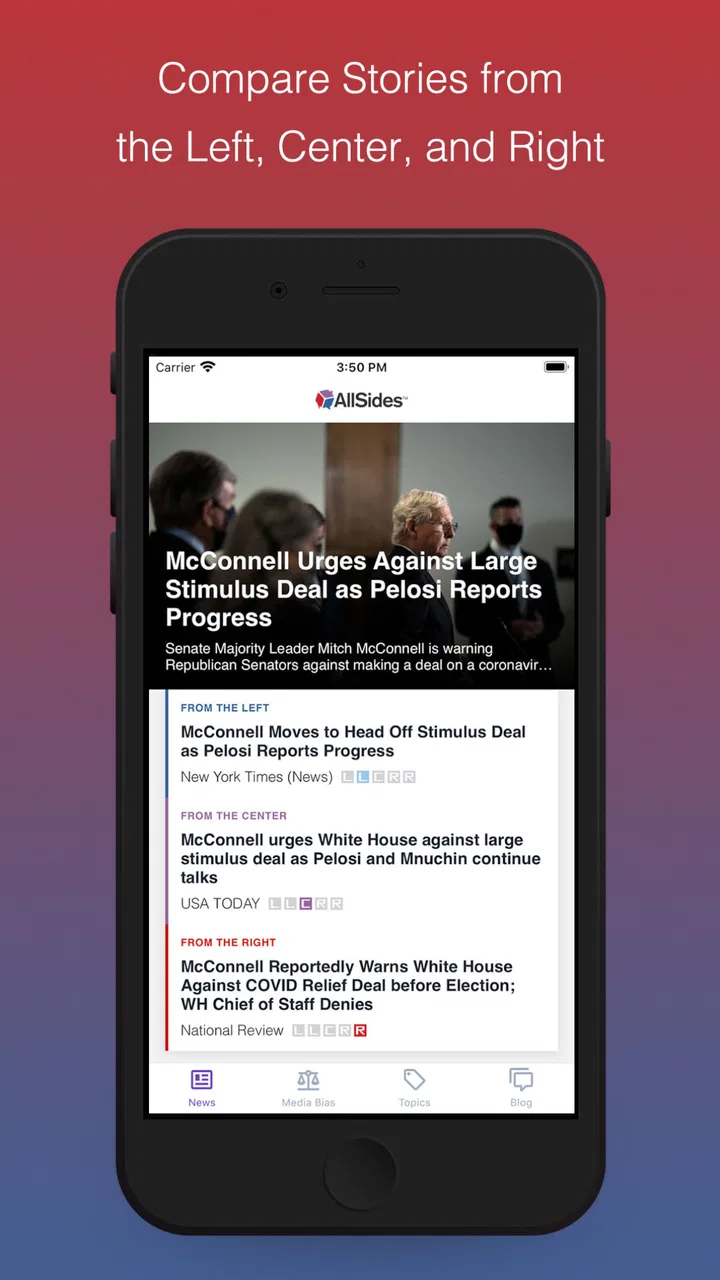
The first thing I would tell a new user is not to expect a traditional newspaper app. You may be used to opening a news service, scanning a long list, and tapping whichever headline looks most urgent. AllSides takes a different approach by placing media perspective near the center of the reading experience. That makes it especially relevant when a subject is politically sensitive or when several outlets appear to describe the same event in noticeably different ways.
You May Also Like

 Pandora - Music & Podcasts
Pandora’s Music Is Easy to Start, but Harder to Recover
Pandora’s strength is its low-effort path from a seed to a station. Its weak spot is how much confidence it asks you to place in connection, setup, and quiet recovery.

 8 Ball Pool
 Is Built on Rivalries, Rematches, and Routine
A close look at the rivalries, rematches, shared routines, and unanswered safety questions that turn a quick pool match into a persistent mobile community.

 Samsung Music
’s Quiet Strength Is Playing What You Already Own
Its reach comes less from spectacle than from dependable access to a personal library. That simplicity is both the app’s strongest retention engine and its ceiling.

 AccuWeather: Weather Radar
AccuWeather Review: A Quick, Clear Forecast for Everyday Decisions
For everyday plans, the best forecast is the one you can understand quickly. AccuWeather makes rain timing, radar, and local conditions easy to act on, with a few trade-offs.

 Hill Climb Racing
Why Hill Climb Racing Still Turns Crashes Into One More Run
A tiny car, a bumpy hill and one more upgrade: Hill Climb Racing keeps resurfacing because its simple chaos makes every near-miss feel personal.

 AliExpress - Shopping App
AliExpress Makes Global Shopping Feel Personal, but Shoppers Bear the Risk
AliExpress turns a global marketplace into a pocket-sized discovery engine. Its reach is useful, its shopping loop compelling, and its trade-offs easy to miss.
More From Our News Desk
View All News


The store summary presents the app as a way to avoid being misled by media bias and find balanced news with media bias ratings. In daily use, I interpret that less as a promise of perfect neutrality and more as an invitation to compare. A rating can be a useful starting signal, but it should not be treated as a final verdict on every article from a publication.
That is the app’s strongest idea and also the point where users need realistic expectations. Media perspective is not the only factor that shapes a story. Reporting quality, the choice of sources, the headline, the date of publication, and the amount of evidence all matter. I like AllSides most when I use its perspective information to guide further reading instead of allowing a label to end the discussion.
The app has a 3.4 average from around 368 ratings, with roughly 172 written reviews. It has passed 50 thousand installs, which suggests it has found a modest audience among readers interested in media literacy. Those figures do not make the decision for me, but they do set the right expectation: this is a focused tool for a particular reading habit, not an all-purpose news platform used by everyone.
AllSides is free, and its content rating is Everyone 10+. It was released on November 2, 2020, and the current version is 2.2.2. The listed minimum operating system is Android 7.0, so people using an older Android phone should check compatibility before planning their reading routine around it.
Who will get the most from it
I would recommend starting with AllSides if you often feel that news coverage is pushing you toward an emotional reaction before you have enough context. It can be useful for students learning to compare sources, families trying to discuss current events more calmly, and readers who regularly encounter claims that seem to conflict with one another.
It also suits someone who already follows a few familiar publications but suspects that habit has narrowed their view. Instead of abandoning those sources, you can use AllSides as a checkpoint. Read the coverage you normally choose, then compare how another perspective frames the same subject. That workflow turns the app into a practical challenge to your routine rather than another source competing for your attention.
I would not make it my first recommendation for someone who only wants local alerts, a highly personalized breaking-news feed, or a single publication’s complete archive. Dedicated newspaper apps and mainstream aggregators are generally better for those jobs. AllSides is more valuable when the question is, “How are different outlets presenting this?” rather than, “What is the fastest update available?”
Getting through the first setup without overthinking it
My advice is to approach the first session with one subject already in mind. It could be an election issue, a public policy debate, a major court decision, or any story you have recently seen repeated across several outlets. Having a real question makes the app easier to understand than browsing randomly through headlines.
After installing it, give yourself a few minutes to explore the main news areas and the media-bias information attached to coverage. Do not rush to decide whether a label agrees with your own opinion. Instead, notice what the label is helping you investigate: the outlet’s general position, the language used in a headline, or the contrast between several reports.
A useful first-session habit is to write down your initial understanding of the subject in one sentence. Then compare coverage with that sentence in mind. Are important facts repeated across perspectives? Which details appear in only one version? Does the wording make the event sound more threatening, more hopeful, or more certain? This turns passive scrolling into a small but meaningful reading exercise.
One subtle advantage of this method is that it protects you from using the app as a confirmation machine. If you open it only to find an outlet that supports what you already believe, you lose much of its value. The better workflow is to choose a topic where you genuinely want clarity, then deliberately read beyond the first comfortable interpretation.
Your first meaningful success: compare before you conclude
The first successful action I would aim for is not saving a favorite story or reading the largest number of articles. It is comparing at least two perspectives on one subject and identifying one difference in emphasis. That small result shows you how the app is meant to be used.
For example, imagine you see a story about a new government proposal. One report may focus on the expected benefits, while another highlights cost, implementation, or possible effects on a particular group. If you read only one version, its priorities can feel like the entire story. AllSides helps make that imbalance visible, which is often more useful than simply receiving another headline.
When I compare coverage, I use a three-pass approach. First, I read the headline without deciding whether it sounds reasonable. Second, I look for the central facts that appear across reports. Third, I examine the details that differ, including which voices are quoted and which consequences receive attention. This takes longer than skimming one feed, but it produces a more dependable personal understanding.
The most useful result is not a label; it is a better question. After using the app, you should be able to ask what evidence supports a claim, what context is missing, and whether the disagreement is about facts or interpretation. That is a stronger outcome than simply declaring one source good and another bad.
A realistic everyday scenario would be checking the app during a lunch break after seeing a heated post on social media. Rather than forwarding the post, I would search for the underlying topic, compare the way different outlets describe it, and return to the original post with more caution. Even if I do not reach a final opinion, I am less likely to mistake a dramatic framing for the whole event.
How the bias ratings should be read
The ratings are best treated as orientation rather than a substitute for judgment. They may help you recognize that a familiar source tends to approach stories from a particular angle, but they cannot tell you whether every individual report is accurate or poorly researched. A publication can produce a careful article on one topic and a weaker article on another.
This is where many first-time users may become confused. “Balanced” does not necessarily mean that every side receives identical space, and a perspective label does not automatically prove that an article is unreliable. Sometimes the evidence genuinely points more strongly in one direction. The responsible use of the app is to compare framing while still checking the substance of the reporting.
I also avoid assuming that two opposing headlines represent two equally strong arguments. One may be based on direct evidence while the other relies more heavily on prediction or opinion. AllSides can help me notice the contrast, but I still need to read the article and judge the support behind its claims.
That limitation is not a reason to dismiss the app. It is a reason to use it properly. The service is most helpful as a map of the information environment. A map can show different routes, but it does not walk the route for you or guarantee that every road is equally useful.
Common confusion and small habits that improve the experience
The biggest source of friction is likely to be the difference between reading news and studying news coverage. If you only want a quick answer, comparing perspectives can feel like extra work. The app asks you to slow down, and that may be inconvenient when you are checking a story between tasks.
My solution is to reserve it for subjects where framing genuinely matters. I would not compare every minor update. I would use AllSides when a story affects my decisions, shapes a discussion with family or colleagues, or is spreading quickly through social media. This selective approach keeps the process manageable and prevents information fatigue.
Another useful habit is to separate three questions: what happened, why it happened, and what should happen next. Different outlets may agree on the first while disagreeing sharply on the second and third. If I mix those questions together, I can mistake an opinion about consequences for a disagreement about the underlying event.
It also helps to read beyond headlines. Headlines are designed to attract attention and compress complicated subjects, so they can exaggerate differences between outlets. I use the headline to choose what to inspect, then look at the article’s actual claims, sources, and explanations before forming an opinion.
For readers who feel overwhelmed by political coverage, I suggest beginning with one topic per session. Do not attempt to understand an entire news cycle through comparison alone. Pick one story, identify the shared facts, note the different emphasis, and stop once you have a clearer framework. The app becomes more useful when it supports deliberate reading instead of encouraging endless checking.
Where it stands beside ordinary news alternatives
A standard news aggregator is usually better at collecting many headlines in one place and adapting quickly to your interests. A newspaper app is often better for a consistent editorial voice, polished long-form reporting, and a familiar reading routine. Social media is faster for discovering what people are discussing, but it is also more vulnerable to repetition, outrage, and context being removed.
AllSides occupies a different position. Its value comes from making the relationship between coverage and perspective more visible. I would pair it with a trusted reporting source rather than ask it to do everything. Use a conventional news app for immediate awareness, then use AllSides when you need to examine how the story is being presented.
That combination is particularly effective for major stories. A fast feed tells me that something happened. A source with detailed reporting helps me understand the evidence. AllSides then gives me a way to compare emphasis and recognize where interpretation enters the coverage. None of the three steps is sufficient by itself, but together they create a more careful workflow.
The trade-off is time. A personalized aggregator may feel smoother because it learns what keeps me clicking. AllSides is more rewarding when I resist that convenience and intentionally look across perspectives. If your priority is speed above all else, another news app will probably feel better. If your priority is media awareness, the extra effort is justified.
Three less obvious ways I would use it
First, I would use AllSides to audit my own media diet once a week. I would think about the publications I normally read and compare them with coverage I rarely encounter. The goal would not be to consume every viewpoint equally, but to discover whether my regular sources leave out recurring concerns or descriptions that matter to the subject.
Second, I would use it before sharing a controversial story with someone who disagrees with me. Instead of sending a link that already reflects my preferred framing, I would compare coverage and explain which facts appear consistent and which parts are interpretation. That makes conversation less about winning and more about identifying the actual point of disagreement.
Third, I would use the app as a teaching aid when helping a teenager evaluate online claims. Because the content rating is Everyone 10+, it may be suitable for older young readers when used with guidance. I would ask them to mark the words that create urgency or certainty, then compare those choices across reports. The exercise teaches a transferable skill: noticing how language shapes judgment.
A fourth workflow is useful for workplace discussions. Before a meeting about a public issue, I might compare coverage and prepare two short notes: the facts that seem broadly shared and the assumptions that vary by source. This does not make me an expert on the subject, but it helps me enter the discussion with fewer unexamined assumptions.
Performance expectations, trust, and the right kind of patience
Because the app is focused on news perspective, its usefulness depends partly on how willing I am to investigate rather than skim. Someone expecting a dramatic, constantly changing interface may find the experience less exciting than a major news network’s app. I see that as a deliberate difference, although it can still feel slow when I want a simple answer.
The developer, AllSides Technologies, Inc, has built the app around a recognizable editorial purpose: making media bias easier for ordinary readers to notice. I appreciate that focus because it gives the product a clear identity. At the same time, that purpose means I need to bring my own standards for evidence, source quality, and relevance.
The average rating of 3.4 indicates a mixed reception rather than universal satisfaction. I would not ignore that signal, but I would interpret it alongside the app’s specialized role. Tools that change a person’s reading habits can feel less convenient than familiar feeds, especially when the benefit is improved judgment rather than instant entertainment.
For a first-time user, the safest expectation is gradual improvement. You may not feel that the app has transformed your news routine after one session. The payoff appears when you begin noticing framing elsewhere: in a headline, a social post, or a conversation where everyone seems to be repeating the same interpretation.
My recommendation after using it
I recommend AllSides to readers who want a practical way to examine media perspective and who are willing to spend a little more time with important stories. It is especially useful for checking your own habits, preparing for difficult conversations, and teaching yourself or a younger reader how to separate shared facts from editorial emphasis.
I would skip it if your only requirement is breaking alerts, local reporting, a single publication’s complete experience, or the shortest possible route from headline to answer. In those situations, a dedicated news source or general aggregator will likely be more efficient.
For everyone else, I suggest starting with one story you already care about. Compare the coverage, identify the facts that remain consistent, and write down one question that the first article did not answer. That is the moment when the app becomes more than another place to browse news.
My final view is positive but measured. AllSides does not remove bias from the news, and it should not be used as a shortcut for deciding which publication is always right. What it can do is make the differences in presentation easier to see. If you want to become a more deliberate news reader, AllSides is worth trying as a companion to your usual sources.
After that first comparison, the next step is simple: keep using the app selectively, especially for stories that are emotionally charged or widely disputed. The goal is not to read everything from everywhere. It is to build the habit of checking the frame before accepting the conclusion.
FAQs for AllSides
01What is AllSides, and what does the app offer?
AllSides is a news and media-bias platform designed to help users compare how different outlets cover the same stories. Instead of presenting only one perspective, it groups reporting from left, center, and right-leaning sources, along with bias ratings and explanatory information. This makes it useful for readers who want broader context and a clearer understanding of how framing can differ across publications.
02How does AllSides determine whether a news source is left, center, or right?
AllSides uses media-bias ratings based on methods such as blind surveys, editorial reviews, community feedback, and comparisons of coverage and language. The ratings describe the general political perspective of a source, not whether every individual article is accurate or biased. Users should therefore treat the labels as a guide for comparison rather than as a final judgment about the quality of all content.
03Does AllSides provide unbiased news?
AllSides does not claim that every article or source is completely unbiased. Its main purpose is to show multiple viewpoints so users can recognize differences in emphasis, wording, and story selection. The app can support balanced news consumption, but readers still need to evaluate evidence, check original reporting, and distinguish political perspective from factual reliability when forming their own conclusions.
04Is AllSides free to use, or does it require a subscription?
AllSides offers access to news comparisons and media-bias information, although the exact availability of features may depend on the current app version, platform, or account type. Some content or tools may be limited, supported by advertising, or placed behind a paid membership. Before downloading, review the store listing and in-app subscription details to confirm current pricing and included benefits.
05Is AllSides suitable for students and people who want to improve media literacy?
AllSides can be especially helpful for students, educators, and anyone trying to develop stronger media-literacy habits. Comparing coverage from different political perspectives encourages users to identify framing, loaded language, omissions, and differing interpretations. However, it should be used alongside reputable primary sources, fact-checking resources, and guidance from teachers or researchers rather than treated as the only source for academic or important decisions.
Pros
- Shows how left
- center
- and right outlets cover the same story.
- Media-bias ratings add useful context when comparing news sources.
- Offers balanced story roundups across several current topics.
- Lets users explore news through multiple political perspectives.
- Clean layout makes browsing headlines and source ratings simple.
Cons
- Some bias ratings may feel subjective or lack detailed explanation.
- The app may not include every major story or local news source.
- Political coverage can dominate the experience over other topics.
- Full article content often depends on external news websites.
- Frequent updates or notifications may require account permissions.

AllSides
Gallery